August was all about making the email editor more beautiful and more dependable, from a long-requested design feature to faster ways to build and edit. We also shipped weekly automated emails, a simple way to share your message on the web, and an extra check to keep your emails landing in the inbox. Here is a look at the highlights.
Background Images on Blocks
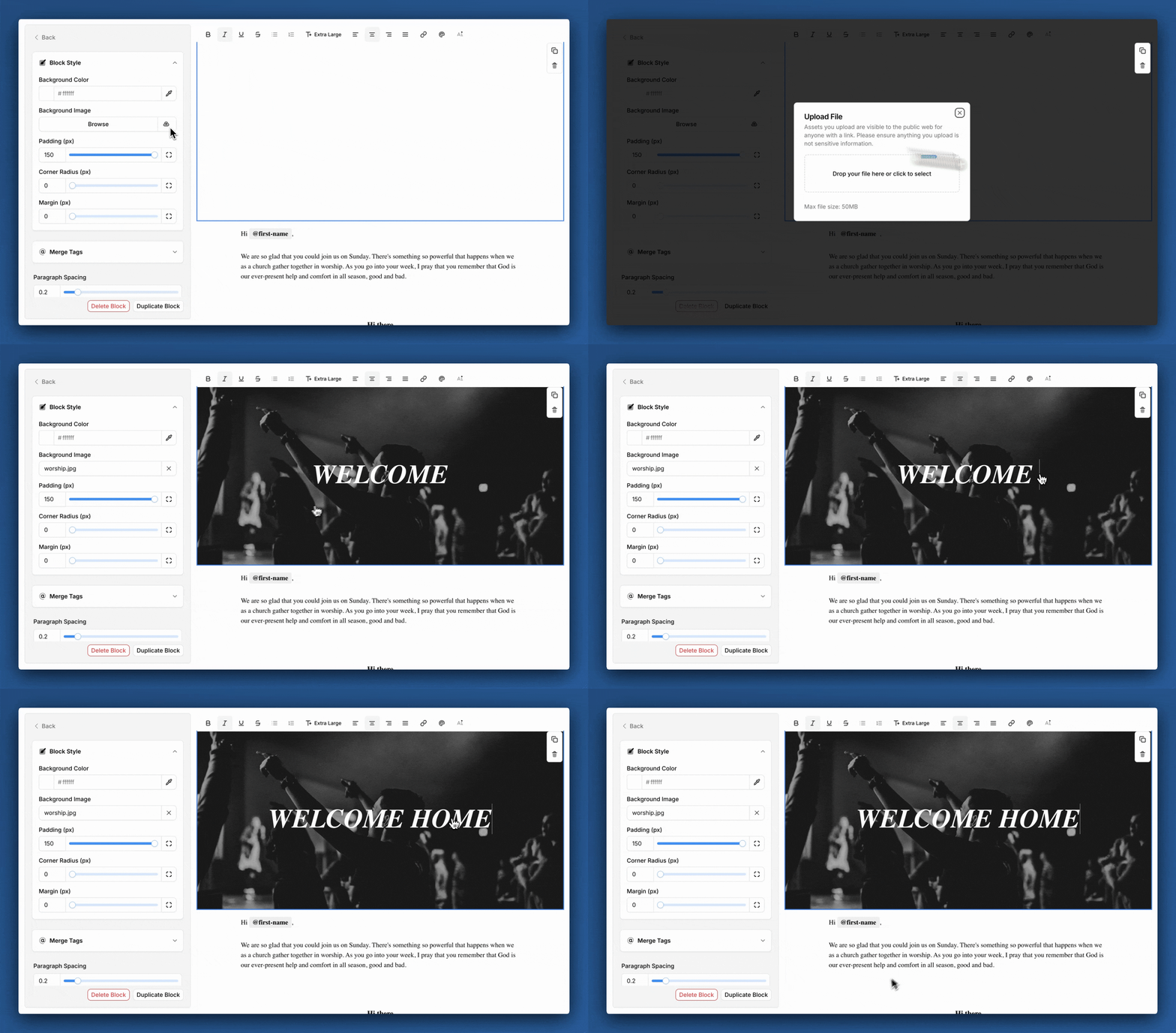
This was one of your most requested features, and we are so glad it is here. You can now add a background image to any block, which helps your emails stand out in an inbox full of noise.
To add one, click a block in the editor, open "Block Styles" in the sidebar, and choose your background image. We think this looks best when you turn off "Card Style" in your email style settings. We cannot wait to see the emails you design with it.
Weekly automated emails
You can now create automated emails that send at the same time each week. It is a great fit for a weekly newsletter, a Sunday reminder, or any message your church sends on a regular rhythm. Set it up once and let it run.
Select and move multiple blocks at once
Building emails just got faster. In the editor, hold down shift or command (control on Windows) to select multiple blocks at once, then move them together. You can also duplicate multiple blocks in one go, and we raised the block limit from 50 to 100 so you have plenty of room to design.
Custom text colors
You are no longer limited to your default and accent text colors. You can now set a custom color for any text in a text block, giving you more freedom to match your church's style.
Share a web link to your email
After you send an email, you can now share a web link to it. It is a simple way to point people to your message anywhere, whether that is a social post, a text, or a follow-up with someone who missed it.
Email validation before sending
We now validate email addresses before sending to them. Planning Center already checks addresses when you add them, but that check does not catch everything. This second look should lead to fewer bounced emails and more messages reaching the people you are trying to reach.
Fixes and improvements
A few smaller updates that made August better:
- The recipients table now tells you why a person was not sent an email, like a missing address, an invalid address, or a shared address with someone who already received it.
- On the post-send page, click any stat to jump straight to a filtered view of the people with that status.
- We now personalize the "to" field with each recipient's first and last name instead of just their email address.
- Block Styles now stay open when you click another block, so you do not have to reopen them each time.
- Bulk changes to list permissions now ask you to confirm, which helps prevent accidental edits.
- We fixed merge tags that sometimes would not convert, including on automation emails.
- We improved automatic column matching when importing people, and added more status details to the People table.
- You can right click the theme selector in the sidebar user menu to pick your theme directly instead of cycling through.
That is a wrap on August. Log in to try these out, and as always, tell us what you would love to see next.